- From the credit card pop up – make sure the full credit card # has been entered including the CVV
- Make sure the CVV is also in the CVV box in the customers Agemni profile.
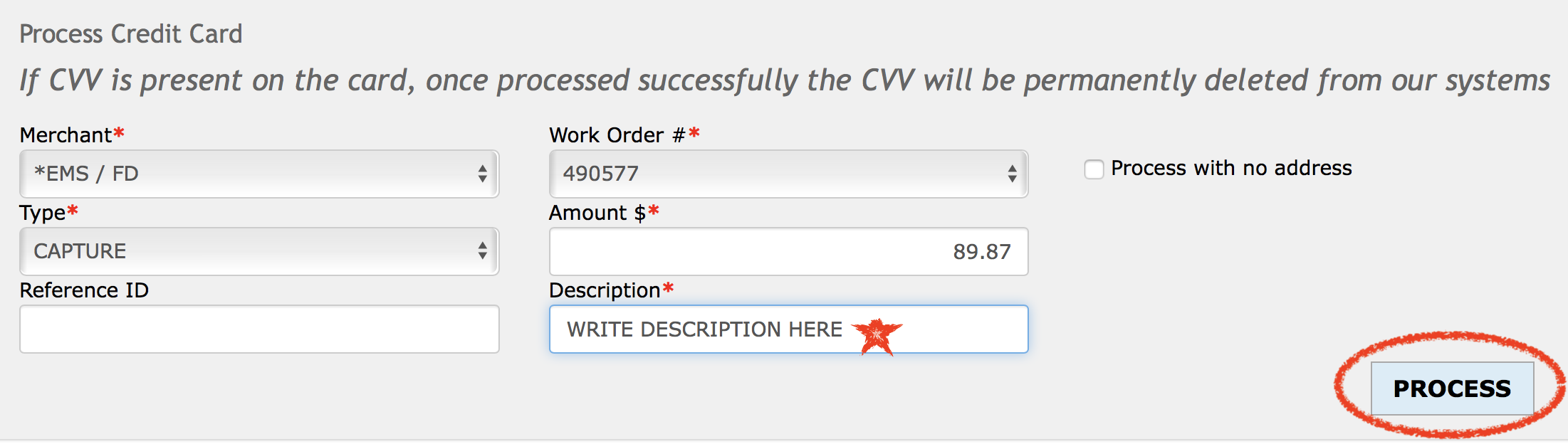
- At the bottom of the credit card pop up you will see the “process credit card” section.
- The default merchant should be *EMS/FD + Make sure the amount is correct + Enter the charge description + then press PROCESS. See the screenshot example below.
- CHARGE DESCRIPTIONS:
-
PRODUCT YOU ARE CHARGING FOR CREDIT CARD DESCRIPTION Protection Plan 2 year Upfront pro 2 Protection Plan 3 year Upfront pro 3 PC/ID Upfront pcid upfront PC Support Upfront pc support upfront ID Theft Upfront id theft upfront ANY DECLINED RECURRING declined recurring
- If you get a decline on the transaction you can confirm the credit card information with the customer again. If the info was wrong correct it and try again. If not hold off until the end of the call.