TASK LIST ITEMS
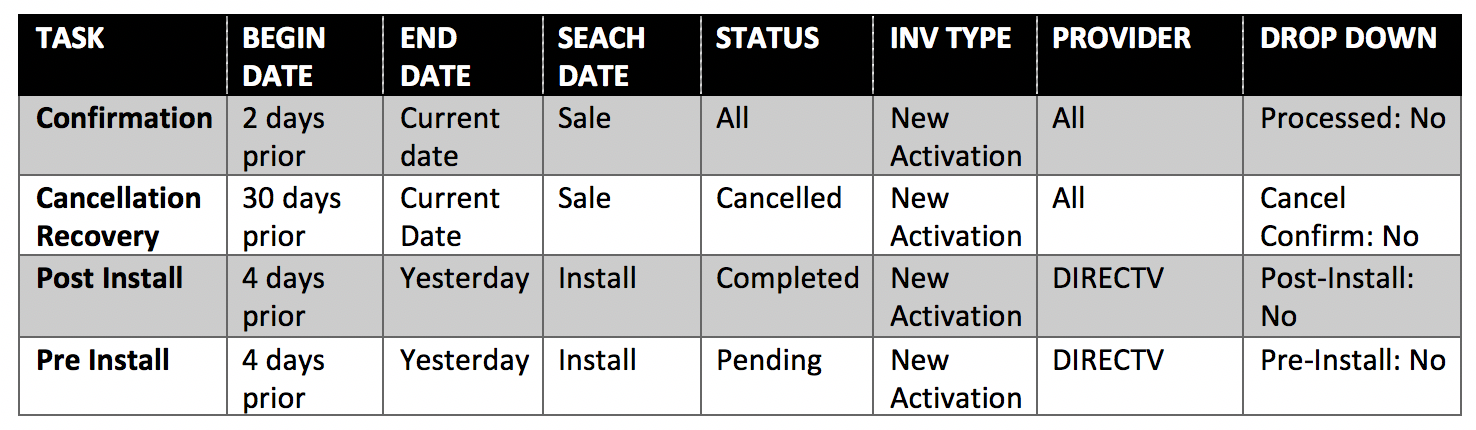
CALLS (* see how to pull reports section for instructions)
Inbound customer service calls
Confirmation calls
Cancellation recovery calls*
DIRECTV pre install calls*
DIRECTV post install calls*
Pro Plan upfront charge failed billing recovery calls*
PC/ID + Pro Plan failed recurring billing recovery calls*
PROCESSING ORDERS – DETAIL
Protection Plan – make sure charged, mark completed, processed.
DIRECTV – make sure promotion is tied to right order entry system, add pending install date, processed.
Hughes – make sure promotion is tied to right order entry system, add pending install date, processed.
ADT – add pending install date, processed.
AT&T Internet – make sure promotion is tied to right order entry system, add pending install date, processed.
AT&T Mobile – – make sure promotion is tied to right order entry system, add pending install date, processed.
PROTECTION PLAN REFUND POLICY:
Within 120 Days:If you purchased your Plan within the last 120 days, you will receive a full refund (unless you have already filed a warranty claim then they amount will be less any claims paid. )
After 120 Days:If you purchased your Plan more than 120 days ago, you will receive apro-rated refund, based on the amount of time remaining on your Plan term less any claims paid.
You can cancel your plan at any time by calling us at 800-533-0287 or emailing support@protectionplancenter.com. Your refund will be processed within 72 hours of cancellation.
PC SUPPORT / ID THEFT REFUND POLICY:
Within 30 Days: Cancel for a full refund.
After 30 Days: The one-time fee or first months bill paid is not refundable however future subscription billing can be cancelled.
How to cancel: You can cancel your plan at any time by calling us at 800-533-0287 or emailing support@protectionplancenter.com. Your refund will be processed within 72 hours of cancellation.
PROCESSING PC SUPPORT
***YOU SHOULD ONLY PROCESS ORDERS THAT NEED IMMEDIATE TECHNICAL SUPPORT HELP. A BACKEND PROCESSOR WILL RUN THESE ORDER THROUGH DAILY.***
CLICK HERE TO PROCESS A PC SUPPORT ORDER THROUGH THE SECURITY COVERAGE WEBSITE
User Name: PPCAccess1 Password: SCppc09!
Copy and paste customers info in the Security Coverage Link. * If the customer does not have an email address do not make one up! Just click the “no email” box.
TO RUN 30 day Free Trial ID Theft in Security Coverage Only
https://partners.securitycoverage.com/home/
U: Protection Plan Center LLC
P: SCppc09!
HERE IS HOW YOU CHOOSE PRODUCTS:
- Persona Defender: Family – Choose this for ID Theft only customers / $9.99 per month
- PC Only – Select for PC Support only customers / $9.99 per month
- PC-ID – Choose this if the customer is getting the PC + ID Bundle / $16.99 per month
Now click Submit – you should be given an activation key / product # – copy and paste that into the Agemni notes, check “processed” in the checkboxes section, and mark the order complete. Then save the account (for bundles you can put either activation # in Agemni)
IF THE CUSTOMER NEEDS AN ACTIVATION CODE TO BE RESENT TO THEM:
click this link https://partners.securitycoverage.com/home/index.php
user name. rep3@dish1up.com
password. rep123
under customer management tab enter their phone # in the search bar and then in the drop down search field make sure it is set to “phone #” (it should default to email.) If you cannot find the customer by phone # you can try other search methods.
Once you have pulled them up click their name. Next confirm the email address that’s in this record and update if you need to. Now to send the activation email again about halfway down the page you will see “existing products” – to the right you will see a little envelope icon. Click that icon and it will resend the email to the customer.
The best way to track an order is by going to www.att.com/checkmyorder
Enter the order number and zip code